It has been a war of attrition. I have loved my little iPhone from day one and it has been my social media BFF for a long time. However the last upgrade to IOS 7. something or other on my 4S has just annoyed me. The love has gone.
Thankfully I am lucky enough to have sampled now, quite a few OTHER types of smartphones that are currently available from TELUS my own provider. Samsung….you have wooed me well. From tiny and convenient as my little iPhone is….the Galaxy Note 3 has won me over. Granted it has taken a bit of a shift in my thinking and a great session with the “teachers” at TELUS…..it really is about what you want or need from your smartphone.
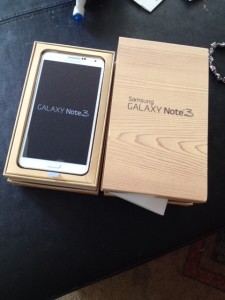
I have to admit that this phone does overwhelm me. It has more features than any other phone out there. The key to making this almost tablet work for you is to think about WHAT you want it to do first. Make a list of all the things you currently love and need PLUS all the things you wish you could do or do easier. Focus on what YOU want this phone to do for you and customize it. Ignore the features you aren’t interested in…there is almost TOO much on this Android phone.
The reason I am switching is this versatility. As a mom of three kids AND blogger and entrepreneur, I have a lot of balls in the air. Basically then, I want MY Samsung Galaxy Note 3 to be my home office when I am not home.
Here is my wish list:
I want a versatile calendar. I want easily read and sorted email. I want a contact list that makes sense. I want a good camera. I want USEFUL connectivity to my blog and to my social media sites. I want to be able to take good clear notes.
Here are a few highlights on the Note that I have figured out already:
- You can change the fonts on almost the entire phone.
- You can find almost ANYTHING on your phone with the S-Finder (left menu soft key)
- Air Gestures. Typically like the motion controls…unless you are used to Android and features like these, I turn em off. I have been convinced about some of the KEY Air Gesture usefulness though. They work best with the stylus and the Air View is probably the most useful feature to learn in my opinion.
- The Notifications Panel. This is the one up at the top of the phone. The panel also enables you to switch off the things you are not using. Customization and power saving.
- Capture Screen. Again for really USING it ….for work etc…things like this are useful. Settings> Controls tab> Palm motion and you can do this with a sweep of your hand.
- Multi View is one of Samsung’s Galaxy’s standards and again is great for turning your phone into a mini laptop. Make sure that the Multi View slider is engaged in the Device tab of Settings.
- The S Pen. I have to admit that this just seems like a backward step BUT again – for expanding the function and uses of the Note, I am rethinking this. You can customize the usage and sensitivity of the pen in the ‘Pen detachment options’ menu within Settings> Controls>S Pen.
- S Pen Apps. The most interesting Note 3 apps are those that make use of the S Pen stylus – and its pressure sensitivity. One of the best, SketchBook, comes pre-installed. As my daughter has discovered, drawing/virtual painting is one of the best uses for the Note 3’s stylus.
- Dropbox. I LOVE that I have it set up to upload my photos directly to my Dropbox account. Especially after my hard drive died.
- Battery life. Amazing battery life. Compared to my poor little 4S this thing is a dream come true.
The faux leather/pleather cover on the phone makes me feel like I am carrying around my favourite moleskine instead of a phone. It really does lean towards tablet more than a phone not just due to its size but for its versatility.
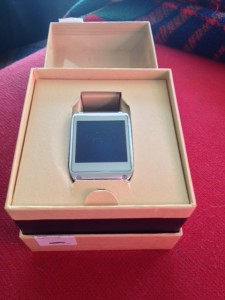
Now for the coolest thing. I was able to test run the Galaxy Gear with the Note. Basically the Gear….the phone you wear on your wrist is an accessory that is ALMOST a necessary tool with a phone this large. Instead of carrying your phone in your hand or trying to jam it into too small pockets on your person, you have the Gear on your wrist. It is connected to the phone via Bluetooth, so you can answer calls, check your social media channels and emails AND take weirdly angled photos WITHOUT ever taking the Note out of your bag. I realize most reviews look at business uses for these things, but for a mom on the run with bags and kids being towed around this is a great and fun idea. My kids also LOVED talking to their wrists. Eat your heart out Dick Tracy.


Leave a Reply